
PixVerse
Screenshots
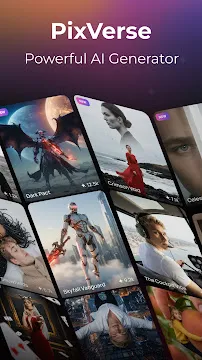
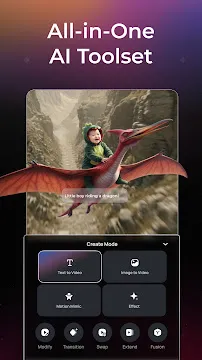
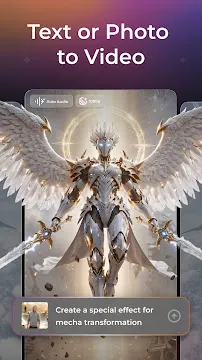
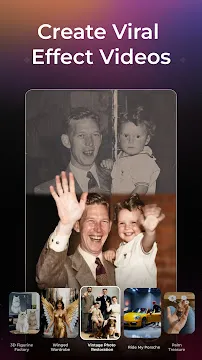
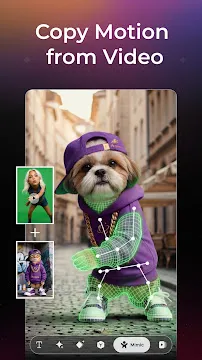
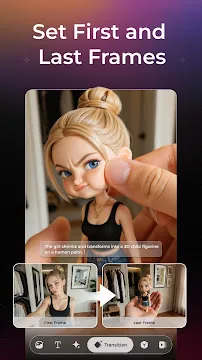
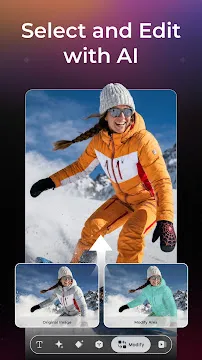
PixVerse is an exceptional tool for creating AI videos directly on your smartphone. You can transform your photos into high-quality clips within a few minutes. Additionally, you can enter text prompts to build completely new scenes. This tool removes the need for complicated computer software. Therefore, anyone can become a video creator instantly. Many people use this mobile software for social media reels and marketing clips. It helps you share your imagination with the world through smooth animations. Then, you can download your final files without any hassle. The platform focuses on speed and simplicity for all mobile users.
What is PixVerse and How Does It Generate Videos?
PixVerse uses advanced artificial intelligence models to process your visual inputs. First, the tool analyzes the details of your uploaded photos. Then, it applies smart physics simulations to predict realistic movements. Because the system understands real-world motion, your characters move naturally. For example, clothing folds and hair moves smoothly in the wind.
You can also use text commands to guide the system. You simply describe the setting, the characters, and the action. After that, the AI processes your words. It builds a beautiful 1080p clip in just a few minutes. Therefore, you do not need an expensive computer to make short films. PixVerse handles all the heavy data processing in the cloud. As a result, your mobile device stays fast and cool during generation. This approach makes mobile content creation accessible to everyone everywhere.
Core Creative Tools Found Inside PixVerse
PixVerse includes a wide range of features for creative individuals. These features give you precise control over your video projects. You can easily modify your files without using external editing tools.
Here is a list of the core features you can explore:
- Text-to-Video Mode: You type a clear description of your vision. Then, the tool creates a matching video clip. This option lets you build imaginary worlds easily.
- Image-to-Video Animation: You upload a still photo from your gallery. Next, PixVerse adds natural motion to the elements. For instance, water can flow realistically.
- First and Last Frame Transition: You provide two different images. After that, the app creates a smooth transition between them. This feature helps connect different scenes.
- Endless Video Extension: You can extend your existing clips. You just describe the next scene to keep the story rolling. Therefore, you can build longer narratives.
- Motion Control: You upload a character image and a reference movement video. Then, the character mimics those exact actions. This tool simplifies complex action sequences.
- Speech Integration: You can type character dialogue into the prompt box. Consequently, the tool adds voiceovers that sync perfectly. This updates your storytelling approach.
These tools allow you to customize every aspect of your project. Because of these features, you save many hours of manual editing work.
How to Create Cinematic Content with PixVerse Step by Step
PixVerse simplifies the video production process into easy stages. You do not need any prior training in animation to begin.
You can follow these clear steps to make your first cinematic clip:
- Open the App: First, launch PixVerse on your Android device.
- Choose Your Mode: Select either the text-to-video tool or the image-to-video option.
- Enter Your Details: Type a descriptive prompt or upload a clear photo from your device storage.
- Select a Preset Style: Choose a cinematic camera movement like panning or zooming.
- Generate the Clip: Tap the creation button to start the AI process.
- Download and Share: Wait a few minutes for the rendering to finish. Finally, download your high-definition video.
If the result is not perfect, you can refine your text prompt easily. Then, you can run the generator again to get new variations. This iterative process helps you achieve your exact creative goals quickly.
Exploring the Trending Effects in PixVerse
PixVerse provides an extensive library of popular templates for mobile creators. These templates help you join viral internet trends without extra effort. For example, you can create the famous AI hug videos with ease. You just upload two separate photos of people. Then, PixVerse generates a realistic clip of them hugging.
Here are some other trending styles available in the app:
- Nostalgia Series: You can restore old, damaged family photos. Then, the tool adds color and introduces life-like motion. Consequently, you can experience old memories again.
- Transformation Series: You can turn normal objects into futuristic robots. Alternatively, you can apply muscle transformations to characters. These edits look highly polished.
- Beauty Series: Users can add magical elements like glowing wings or mist effects. This style enhances the visual mood instantly. It makes your clips feel cinematic.
- Miniature World: This effect shrinks your photos into tiny interactive characters. Then, you can watch them explore fun adventures. Kids and adults love this look.
Because these templates update regularly, you always have fresh options for your content. Therefore, your social media feeds will remain interesting to your followers.
Why Mobile Creators Prefer PixVerse for Social Media
PixVerse has become a favorite choice for influencers and online marketers. One major reason is the rendering speed. The system generates high-definition clips in less than five minutes. Therefore, you can produce multiple videos in a single afternoon.
Furthermore, PixVerse maintains excellent character consistency across frames. In many other AI tools, faces change randomly during motion. However, PixVerse keeps facial features and clothing stable throughout the clip. This stability is crucial for continuous storytelling.
Additionally, the tool offers cost-effective options for independent creators. You do not need a large budget to start making professional content. Because the workflow is straightforward, you also save money on editing staff. This platform gives individual creators the ability to compete with large studios. Consequently, it changes how independent media is produced.
Conclusion
PixVerse represents a significant advancement in mobile video creation technology. It combines text commands, image animations, and trending effects into one accessible package. Because it uses cloud processing, it runs smoothly on Android devices. You can generate cinematic videos without facing a steep learning curve. Therefore, it is ideal for both beginners and experienced social media managers. You can download PixVerse today to begin your creative journey. Then, you can turn your abstract thoughts into stunning visual realities.